Businesses · Avanbox

“My software doesn’t allow that.” We do.

Very often, a large management system (ERP) forces your company to adapt the way it works in order to use it. We do the opposite: we adapt the software to the way you work. With our own software, and without charging you per user.

What we hear

Sound familiar?

  • “That’s a custom development. Six months.”
  • “On top of the software, I need several spreadsheets to keep track of everything.”
  • “Every new employee, another licence.”
  • “Please open a ticket.”
  • “The delivery notes arrive on Friday, and someone has to decipher them.”
  • “Everyone’s payslips arrive in a single file, and I have to split them up one by one.”
  • “My data is mine, but to get it out they give it to me in twenty spreadsheets.”

If you recognised yourself in any of these, read on. That’s exactly when people call us: when the software can’t stretch any further. When real solutions are needed.

How we work

Your way of working is the right one. Let the software change.

We’re not going to tell someone who has been doing their job well for thirty years to start doing it differently. We’re going to take away what they don’t need: typing, searching, chasing paperwork. Less stress and more time.

In three steps

  1. 01

    You tell us

    One hour, free of charge. We look at your process as it really is, with the people who do it every day.

  2. 02

    We tell you whether we can help you, and with what

    Honestly, and with a fixed price in writing. If it’s not for us, we’ll tell you in that same meeting.

  3. 03

    We set it up, and we stay

    Installation, a short training session and the same person on the phone.

Cases

What we’ve already solved.

Real cases. No names, because they belong to our customers.

  1. 01

    Nova · Astra · Core · ERP

    Supplier invoices that go into the ERP on their own

    What their software didn’t do
    Supplier invoices arrive through different channels, and someone keys them into the ERP by hand and then looks for their purchase order and delivery note.
    What we did
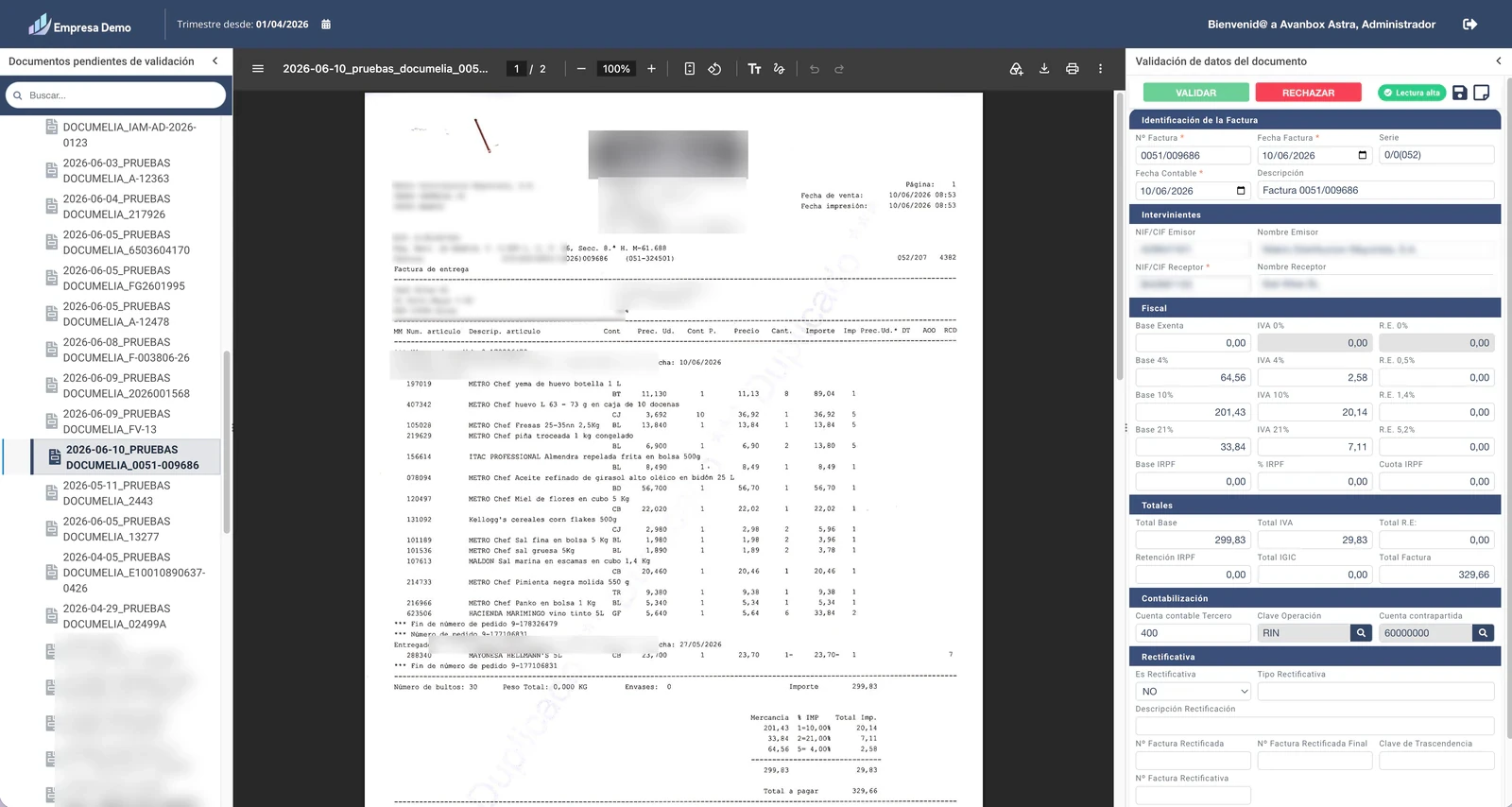
    Invoices arrive through Nova or by email, are read by the two artificial intelligences, are reviewed on Astra’s matching screen and pass to the ERP linked to their purchase order and delivery note.
    How it turned out
    Invoices go into the ERP without being keyed in, each one alongside its purchase order and delivery note.
    Avanbox Astra matching screen (interface in Spanish): the invoice on one side and the extracted data on the otherTap to see the full screen

    Swipe to see the rest

    Avanbox Astra matching screen (interface in Spanish): the invoice on one side and the extracted data on the other
    1. 01Nova or emailthe invoice arrives
    2. 02Two AIsread it and cross-check
    3. 03Matching in Astrareviewed and validated
    4. 04Your ERPwith order and delivery note
    Astra’s matching screen. Interface shown in Spanish.

    When an invoice is validated on its own. Only when both conditions are met at the same time: the supplier is on the whitelist and the two readings agree. In any other case, a person reviews the invoice in Astra.

    Out of 7,200 invoices in very different formats, only 6 needed a manual correction of any extracted data.

  2. 02

    Configured for your company

    Receiving at the loading dock

    What their software didn’t do
    Companies with a receiving dock and a wide variety of items, where every delivery note received has to be checked against its purchase order.
    What we did
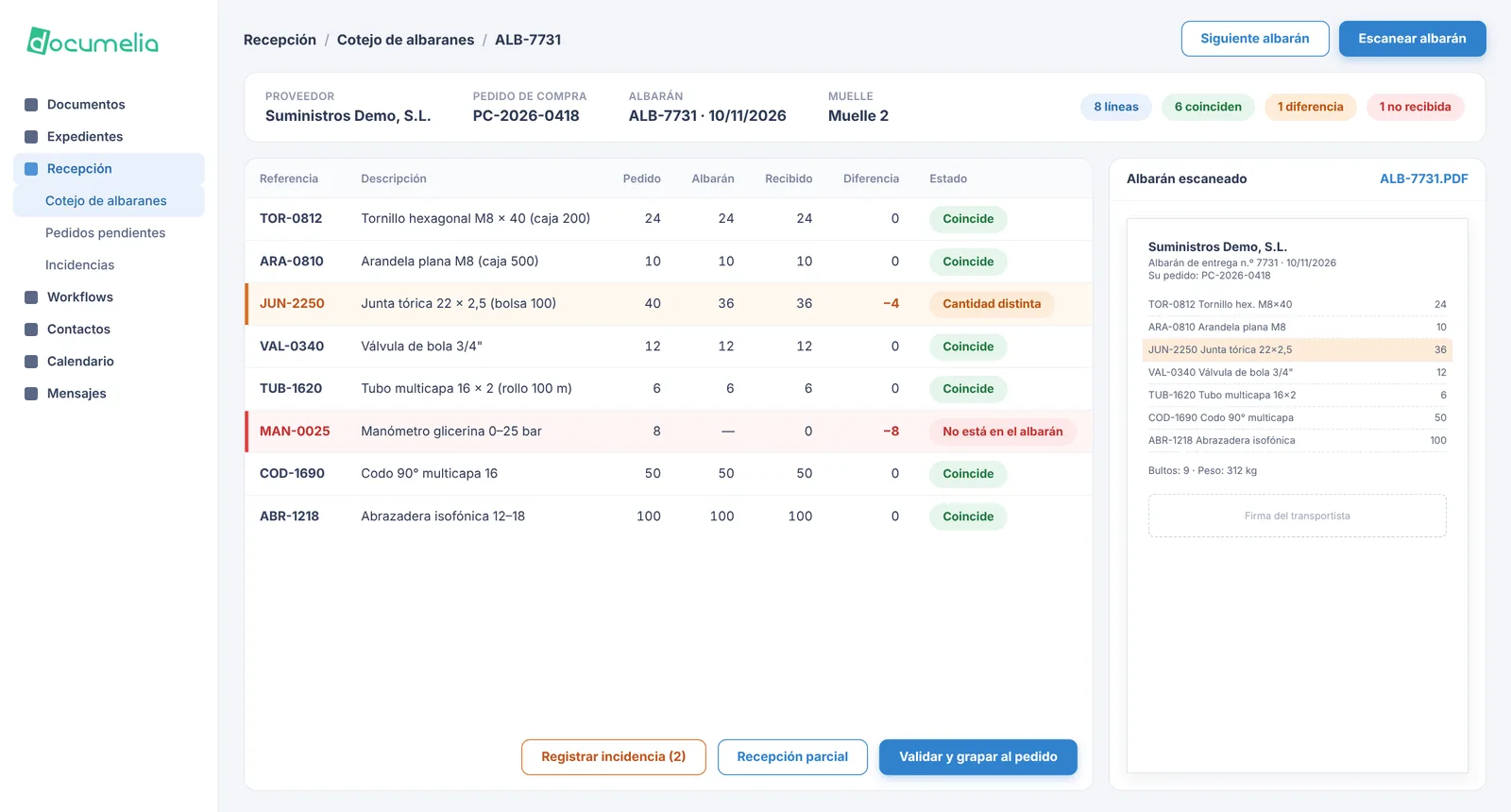
    We configure for your company a screen that matches purchase orders against the delivery notes received. It is not an off-the-shelf screen: it is set up according to how each customer receives goods.
    How it turned out
    Less time and fewer errors when receiving goods.
    Example of a delivery note matching screen (interface in Spanish): the lines of the purchase order against those of the delivery note received, each marked as matching, different quantity or not on the delivery note, and the scanned delivery note on the rightTap to see the full screen

    Swipe to see the rest

    Example of a delivery note matching screen (interface in Spanish): the lines of the purchase order against those of the delivery note received, each marked as matching, different quantity or not on the delivery note, and the scanned delivery note on the right
    Example of a dock matching screen, with sample data. Interface shown in Spanish.
  3. 03

    Alerts by email

    Expiry dates under control

    What their software didn’t do
    Contracts, insurance policies, supplier certificates, the fleet’s vehicle inspections, authorizations: documents with an expiry date scattered all over the company.
    What we did
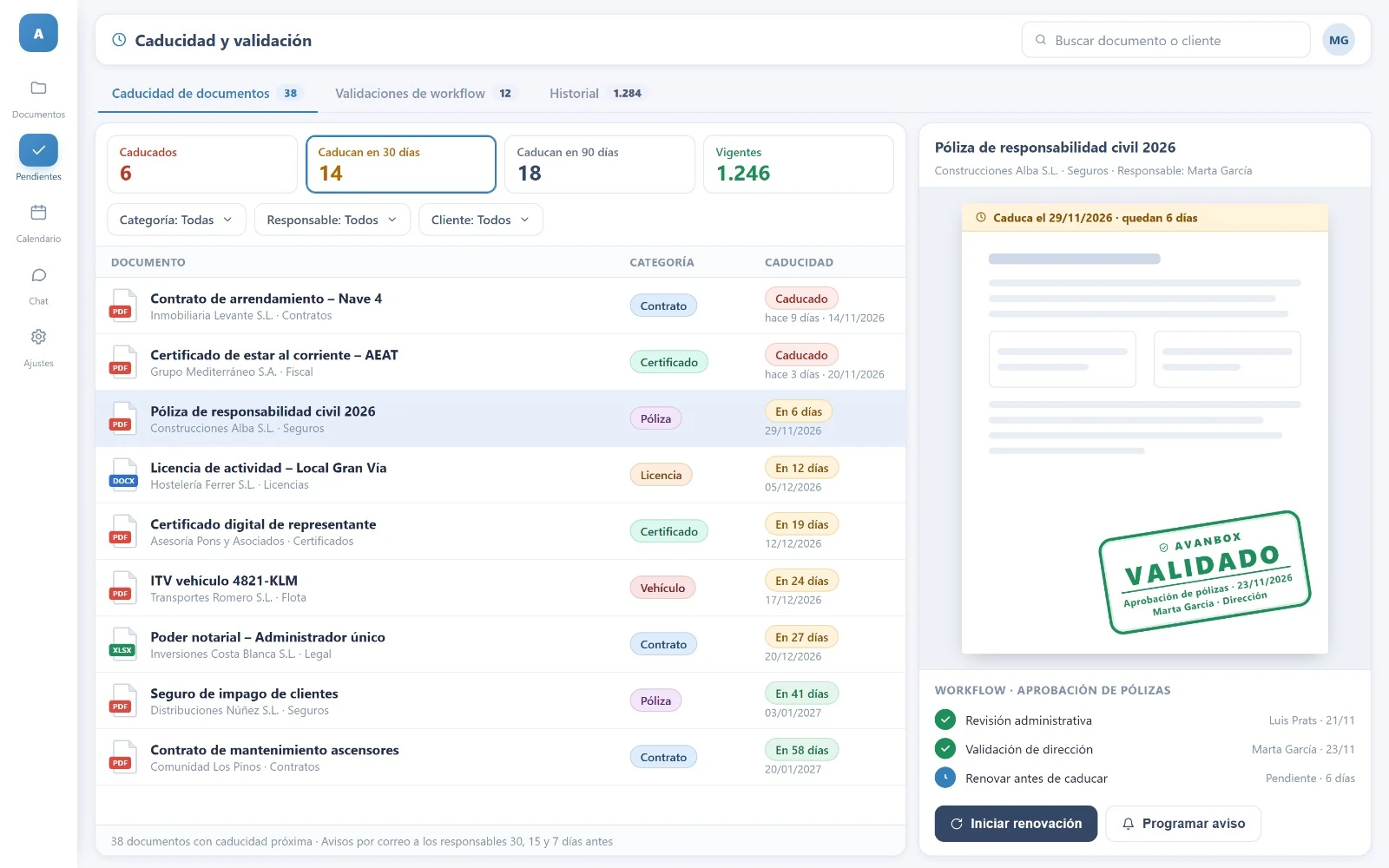
    The system detects that something is about to expire and alerts the person responsible by email. The document is renewed and stamped as validated.
    How it turned out
    Expiry dates stop slipping through, and everything is recorded.
    Example of a document expiry and validation screen (interface in Spanish): the list of documents with their category and expiry date (expired and about to expire) and, on the right, an insurance policy that expires in 6 days, stamped as validated, with the steps of its approval workflowTap to see the full screen

    Swipe to see the rest

    Example of a document expiry and validation screen (interface in Spanish): the list of documents with their category and expiry date (expired and about to expire) and, on the right, an insurance policy that expires in 6 days, stamped as validated, with the steps of its approval workflow
    1. 01About to expire
    2. 02Alert to the person responsible
    3. 03Renewed
    4. 04Stamped as validated
    Example of a document expiry and validation screen, with sample data. Interface shown in Spanish.
  4. 04

    A single searchable PDF

    Email, into the case file

    What their software didn’t do
    Much of the history of a case is in email: messages back and forth, with their attachments, in each person’s mailbox.
    What we did
    An email thread with its attachments is saved as a single searchable PDF inside the case file. And because Avanbox has the email client built in, an incoming message can start a workflow without leaving the program.
    How it turned out
    The whole conversation stays in the case file, next to the rest of the documents of the case, and can be searched.
    Messages inside Avanbox (interface in Spanish): the email accounts on the left, the inbox in the middle and, on the right, an open notification from FACe, the Spanish public e-invoicing platform. People’s names and some messages are blurredTap to see the full screen

    Swipe to see the rest

    Messages inside Avanbox (interface in Spanish): the email accounts on the left, the inbox in the middle and, on the right, an open notification from FACe, the Spanish public e-invoicing platform. People’s names and some messages are blurred
    Email, inside Avanbox. Interface shown in Spanish.
  5. 05

    Bulk scanning · Synced folders

    Paper and folders that file themselves

    What their software didn’t do
    Piles of paper waiting to be filed and documents arriving every day, which someone has to read, classify and save one by one.
    What we did
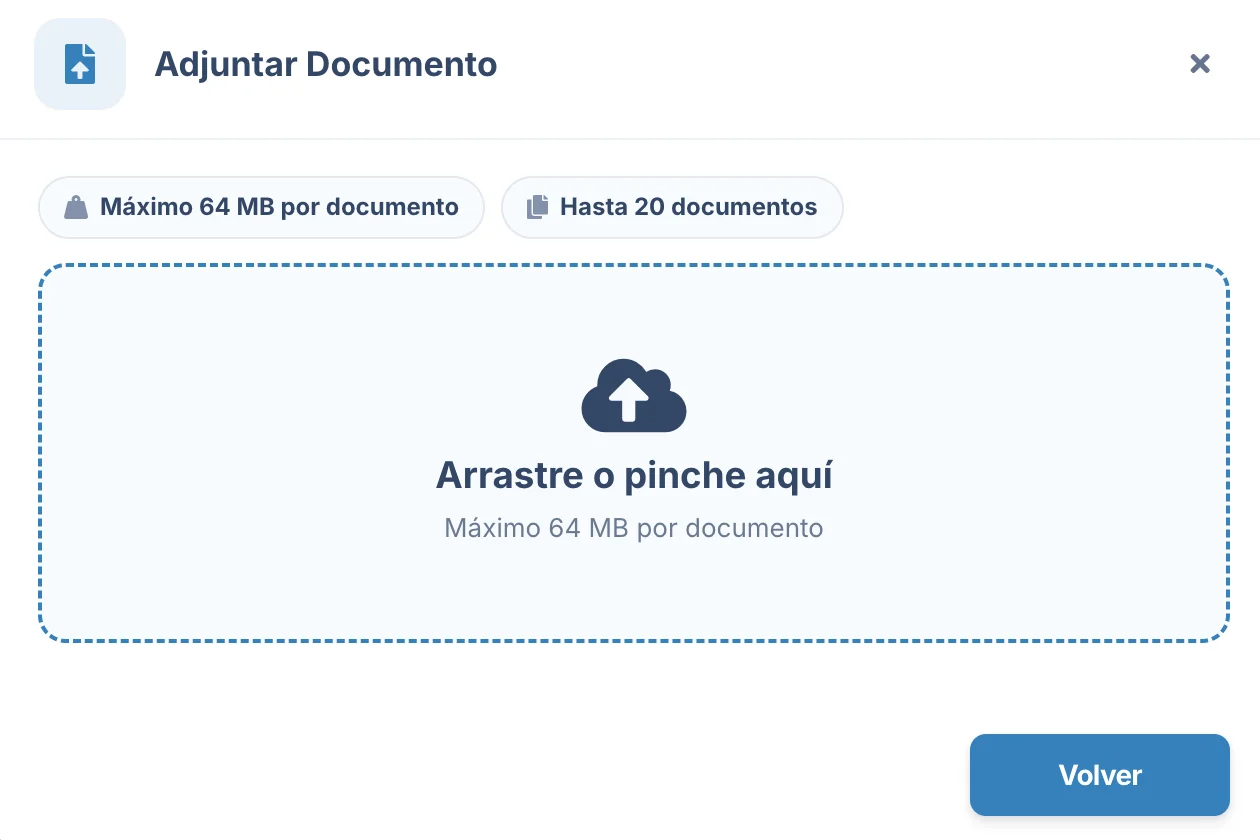
    Bulk scanning with QR separator sheets, which mark where one document ends and the next begins. And synced Windows folders: just drop a document into them and it is read, classified and sent to its case file.
    How it turned out
    Paper and files reach their case file without being filed by hand.
    “Attach document” window in Avanbox Core (interface in Spanish): an area to drag files onto or click, up to 20 documents and a maximum of 64 MB per document
    Attaching documents in Core: drag and drop. Interface shown in Spanish.
  6. 06

    Autofirma · FNMT · Spanish electronic ID

    Signing without taking the document out of the document manager

    What their software didn’t do
    Documents that have to be signed with a certificate and that, in order to be signed, leave the place where they are filed.
    What we did
    Digital signature with Autofirma and a certificate (FNMT, Spanish electronic ID card) from within the document manager itself, from your computer or your phone.
    How it turned out
    The document is signed where it is stored, without leaving the document manager. And when a handwritten signature is enough, you sign with your finger on your phone.
    1. The document, filed

    2. Signed with a certificateAutofirma, FNMT or Spanish electronic ID

    3. Still in its placewithout leaving the document manager

  7. 07

    Groups of companies

    Several companies in a single installation

    What their software didn’t do
    A group with several companies that needed to work with all of them from the same place, without anyone seeing more than they should.
    What we did
    A single installation for all the companies in the group, with permissions per company and per user.
    How it turned out
    The whole group works in the same installation, and each person sees only the companies that concern them.

    Every company in the group

    • Company A
    • Company B
    • Company C

    A single installation

    Permissions per company and per user

Avanbox Aura

Don’t go into the quotes screen. Ask for it by voice.

Ask for the quote on your phone, by talking to our AI. It asks you about anything that isn’t clear, prepares the quote and sends it by email. Just what your secretary would do.

Avanbox AuraExample

  1. You

    Make me a quote for Talleres Demo: a check-up of two machines.

  2. AI

    Shall I send it to their usual email? How long should it be valid for?

  3. You

    Yes. Fifteen days.

  4. AI

    Done. Quote sent, valid for 15 days.

Field teams · Avanbox Aura

What happens out in the field, in the office right away.

If your company has technicians, installers or crews working out in the field, you know the routine: the schedule lives in a spreadsheet, and you only find out what really happened at the end of the day, when the paper delivery notes come in.

Delivery notes written in a hurry, sometimes unreadable, that then have to be explained to the supervisor in person to piece the day back together. With Avanbox Aura, the information from every job reaches the office in real time.

Avanbox Aura, with Nova and Core

  1. 01

    Avanbox Aura

    The ERP in Avanbox, Documelia’s application; field team management is one of its functions. The office uses it to plan the calendar, the bookings and the tasks.

  2. 02

    Nova

    The technician’s app, on their phone. It shows them the day’s jobs and connects them with the office.

  3. 03

    Core

    The document manager. It keeps a file for every job, organized automatically.

  1. Avanbox Aura · Calendar

    Plan every job on one calendar

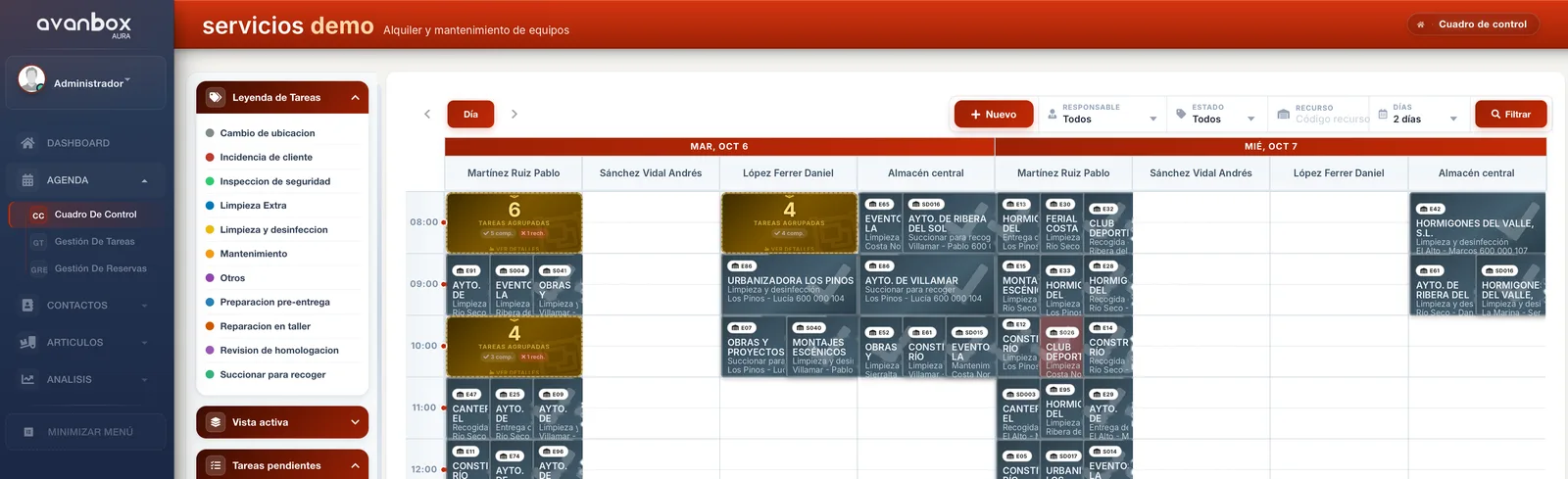
    The Avanbox Aura calendar brings together all your technicians’ jobs. Each job can carry its bookings, its materials and whatever else it needs.

    • Reassign by dragging: the administrator moves and reassigns jobs by dragging them with the mouse.
    • Pending tasks, like order tickets: tasks waiting to be assigned pile up in a list, like order tickets, and get assigned as you drag them onto the calendar.
    Avanbox Aura calendar (interface in Spanish): on the left, the legend of task types and the pending tasks panel; on the right, a two-day schedule with one column per technician and each one’s jobs laid out by the hour
    The Avanbox Aura calendar: one column per technician, with their jobs by the hour. Demo data; interface shown in Spanish.
  2. Routes

    Routes: Avanbox Aura suggests, the office adjusts

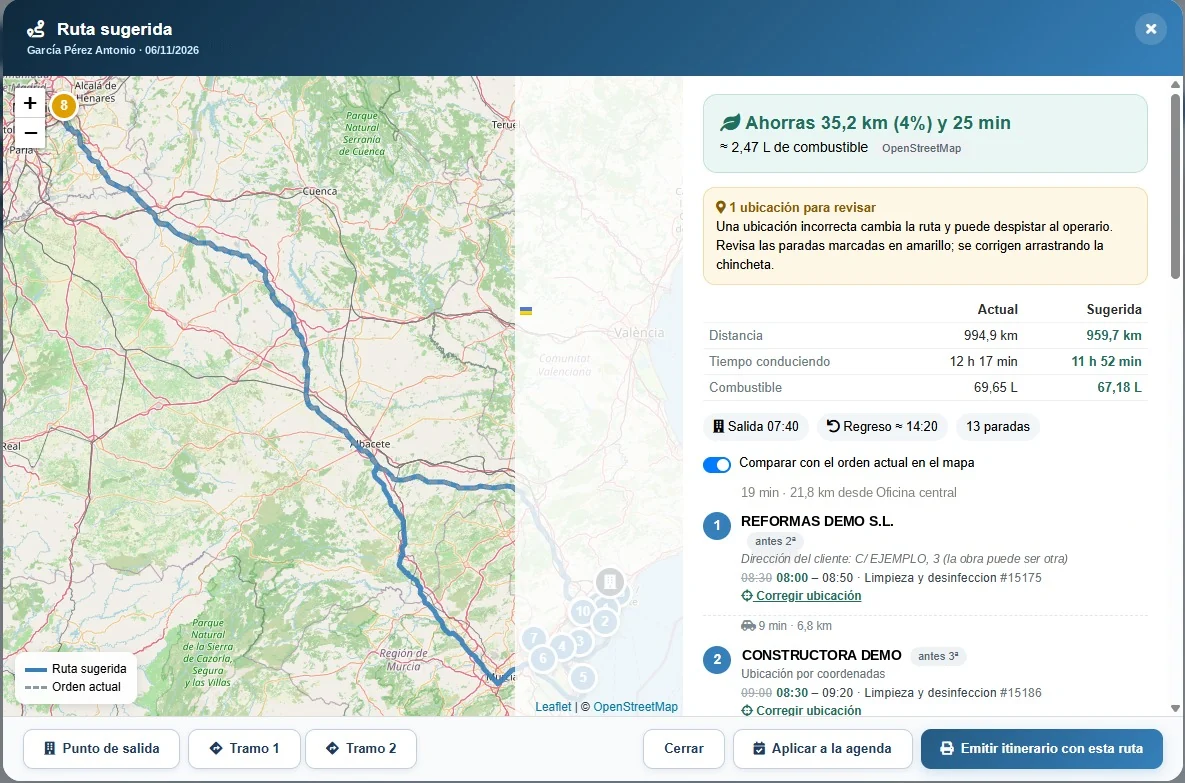
    With the day’s jobs on the calendar, Avanbox Aura suggests a route for each technician.

    The office reviews it and adjusts it whenever needed: you always have the final say.

    Suggested route for a technician (interface in Spanish): the route on the map and, beside it, the distance, time and stops for the day
    Suggested route for a technician. Demo data; interface shown in Spanish.
  3. Rentals and maintenance

    Rentals, deliveries, pick‑ups and maintenance

    If you rent out equipment, Avanbox Aura handles the rentals with their deliveries and pick-ups: for example, construction machinery or portable toilets for a festival.

    Recurring maintenance

    Maintenance jobs that repeat—for example, cleaning and disinfection twice a week—are generated automatically on the calendar, if you choose.

    Bookings with their own management

    Bookings are managed in their own right and distinguish two kinds of items:

    • Tracked individually, with a serial number: for example, a machine, with its workshop record, usage history and parts.
    • Tracked by quantity: items with no identity of their own: for example, rental chairs for a parade.
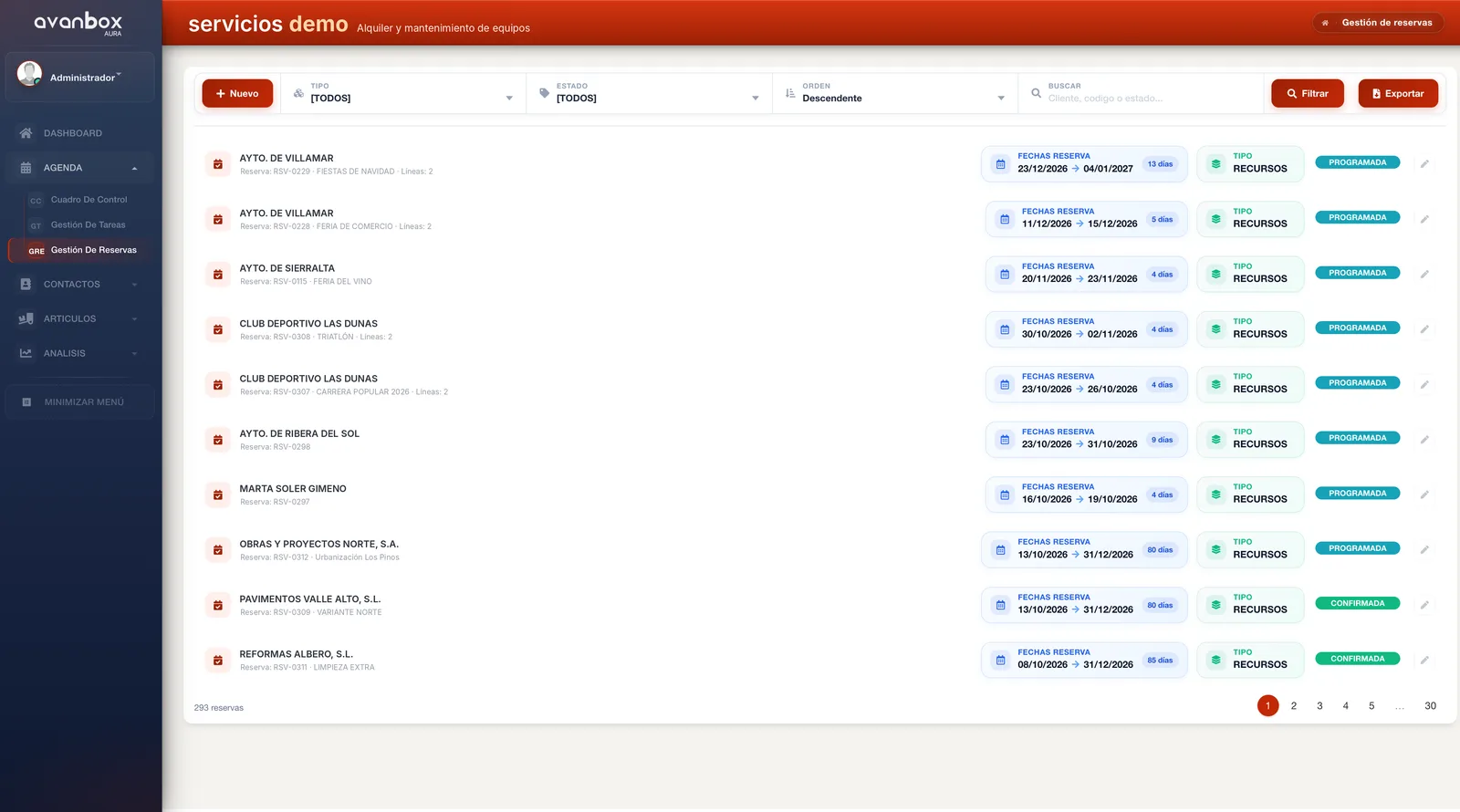
    Booking management in Avanbox Aura (interface in Spanish): a list of bookings with the customer, the booking number, the start and end dates, the length in days, the type and the status (scheduled or confirmed)
    Booking management in Avanbox Aura: dates, length and status of each booking. Demo data; interface shown in Spanish.
  4. Nova · Core

    The technician, with Nova on their phone

    Nova is the technician’s app: the same Nova that accounting firms’ clients use, here in the hands of your team.

    • A mobile-friendly web app: it opens in the phone’s browser, with nothing to install from the app stores.
    • The day’s jobs: Nova shows the technician the jobs assigned to them.

    A chat for every job, and everything goes to the file

    Every job has a direct chat between the technician and the office:

    • Photos: of the situation they find or of the finished work.
    • Text: for anything that needs to be put in writing.
    • Voice notes: which are transcribed, so you can read them without having to listen.

    Everything is saved in the job file, which is organized automatically in Avanbox Core. The office has it all at hand, from the calendar or from the file in Core.

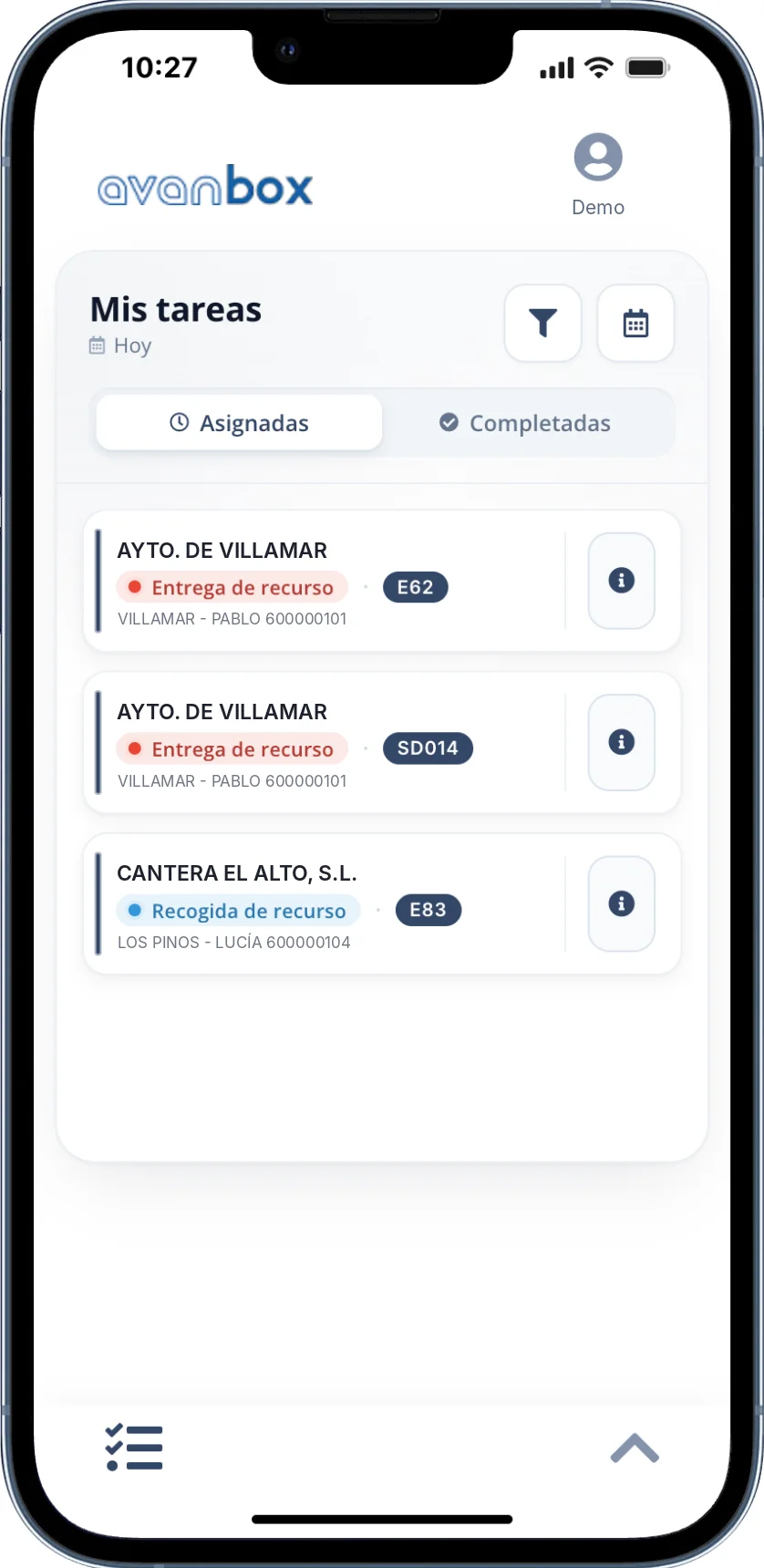
    Nova on the technician’s phone (interface in Spanish): today’s “My tasks” screen with three assigned jobs, two deliveries and one pick-up, each with its customer and location
    Nova on the technician’s phone: today’s tasks. Demo data; interface shown in Spanish.

Invoicing

Invoicing: with Avanbox Aura or with your ERP

Completed work can be invoiced in two ways:

  • With Avanbox Aura: which invoices and is VeriFactu compliant.
  • With your ERP: Avanbox Aura sends it the data so you can invoice from your own software.

Connects with:

  • Navision
  • Odoo
  • Sage
  • and others, depending on the case

Who it is for

For companies with teams out in the field

Technicians, installers, loss adjusters, construction, rental or maintenance crews:

  • Installers
  • Maintenance
  • Machinery and equipment rental
  • Event services
  • Cleaning
  • Loss adjusting
  • Construction
  • and other companies with field teams

Download the brochure (PDF)

Commitments

What we put in writing.

  1. 01

    A fixed price before we start.

    No open-ended hours and no surprises.

  2. 02

    No per-user cost.

    Your whole workforce comes in, today and as it grows.

  3. 03

    AI at cost price.

    We pass on what it costs us, with no margin.

  4. 04

    No lock-in period.

    Your data is yours: if you leave, you take it with you in one click, folders included.

  5. 05

    A real person, in Spain, with a name and a mobile number.

    Someone you can actually talk to. No tickets.

  6. 06

    If it’s not for us, we’ll tell you.

    And we’ll point you to who can solve it better.

Still paying per user?

Hiring someone shouldn’t push up your software bill. With Avanbox, the whole company comes in for the same price.

Prices

Core · document manager, for the whole companyfrom €249/month
Ecosystem pack · Core + Nova + Astra + connection to your ERPfrom €449/month
Avanbox Aura · ERP with Core included; VeriFactu compliantfrom €349/month
Field teams (on top of Avanbox Aura)from +€149/month
Hosting in our cloudfrom €49/month
Hosting on your own server+15% maintenance on the fee
Setup and implementation (one working day)from €400

No per-user cost. Additional company: from +€49/month. 10% discount with annual payment. AI reading is passed on at cost price. Prices exclude VAT.

Customers

You won’t be the first.

Companies, city councils and organizations all over Spain work with Avanbox every day. Behind it is a team with more than twenty years of experience, living the day-to-day of companies and of the people who make them up.

  • Adeslas Castelldefels
  • Advantia
  • Airpres España
  • APE Grupo
  • Arzobispado de Zaragoza
  • Asesores Inquietos
  • Asesoría Jurídica Mayo
  • Atlántica Agrícola
  • La Nucía, Ciudad del Deporte
  • Ajuntament del Puig de Santa Maria
  • Ajuntament de Polop de la Marina
  • Ajuntament de Sagunt
  • Ajuntament de València
  • Brokers 88
  • Cárnicas San José
  • Centro de Empleo Castelar
  • Tinabana Salud
  • Cerámica Ribesalbes
  • Clavicant
  • Clínica de la Cuesta
  • Codicer 95
  • Colavoro
  • Construcciones Valbuena
  • Construcciones Zarzuela
  • Cooperativa Agrícola de Petrer
  • Dataservice Margarita
  • Dealerbest
  • Dismat
  • El Xato Catering
  • Embotits Salgot
  • Esame
  • Esmaldur
  • Eurosofa
  • Ascensores Excelsior
  • Fanal Cerámica
  • Spanish Basketball Federation
  • Frespalos
  • Fundació Cirne
  • Fundación Siglo (Junta de Castilla y León)
  • Gamo Abogados
  • Gestoría Corcos
  • Grecar
  • Grupo Bambú
  • Transportes Picó
  • CIPFP Misericordia
  • IMD Clínica Capilar
  • Inquiport
  • Insserco e Insserfo
  • Inserta Empleo
  • Jardinia
  • José Oset
  • Automáticos Leafex
  • Mas García Asesores
  • Lormec
  • Mainzu Cerámicas
  • Manatex Textiles
  • Palomares Piel
  • Pedro Miralles
  • Pinturas Ballester
  • Porcelanite
  • Prodasva
  • Proteus Innova
  • Reformas Inteca
  • Reveal Maquinaria
  • Rivero Construcciones
  • Semamcoin
  • Servyeco
  • Sindicatura de Comptes de la Comunitat Valenciana
  • Sucesores de Pérez Verdú
  • Surcando Mares
  • Asesoría Tabora
  • Tadeo Logística
  • Tindaya Social
  • Toldos Morales
  • UGT Castilla y León
  • Victoria Cars

Under the hood

Our own software, not a patchwork.

  • Core

    Document manager and case files

    It is the centre: this is where the case files, the workflows and the archive live. A case file is a special folder that brings together everything about one case: customer, site or project, employee, supplier or administrative.

    It looks like Windows Explorer: users start working from day one.

  • Nova

    The portal

    Your suppliers drop off their invoices there, and your customers receive your company’s invoices, neatly organized.

    And on the phone, it is the technician’s app.

  • Astra

    The invoices

    Reading by two cross-checked artificial intelligences, a matching screen, and bank reconciliation connected directly to the bank through a service.

  • Avanbox Aura

    The suite’s ERP

    And if you are not happy with your ERP… Avanbox Aura, the Avanbox suite’s own ERP.

  • API

    Connection with your ERP

    Your company has already invested in its ERP. Don’t change it: make it more powerful.

    Avanbox integrates via API—a direct connection between programs—with your ERP. It complements it; it does not replace it.

  • Security

    Every document, protected and with its history

    • Encryption: every document is encrypted when it is uploaded.
    • Permissions: per user or per group. A folder can even be invisible to anyone who should not see it.
    • Versions: the versions of every document are kept: which is which, from when, and who saved it.
    • Audit trail: who opened each document, who modified it, printed it or sent it.
    • Wherever your company needs it: installed on its servers or in the cloud.

Download the brochure (PDF)

Contact

What is it that your software doesn’t do?

Tell us. If we can solve it, we’ll tell you how and what it costs. And if we can’t, we’ll tell you that too.

Who is writing? *

Controller: Documelia Gestión Documental, S.L. Purpose: to answer your enquiry. Legal basis: your consent. We do not share your data. You can exercise your rights by writing to info@documelia.com. More information in the privacy policy.